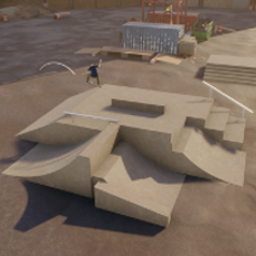
Replaces the untextured items in build kit / quick drop with textured ones. No more ugly white builds. Rails are metal, Stairs / ramps / ledges are stone
Changelog: Update:1.02 added stone texture to newly added bowl items Update:1.03 added gold texture to newly added loading dock rail Update:1.04 added textures to various decorative & furniture items, added updated quickdrop menu icons for all retextures
Install Simple Prop Retexture
You need ReSkate and your own copy of skate. on Steam.
- Open
ReSkateLauncher.exeand go to MODS. - Search for Simple Prop Retexture and click install. The launcher also installs anything it depends on.
- Press PLAY. In game, the MODS tab of the ReSkate menu (Insert) turns it on and off.
Or install it by hand: download the .zip and drop it on the launcher window, or unzip it into its own folder in Mods\ beside Skate.exe.
Maps show up in the ReSkate menu's level list. To join a server running a custom map, you need the same map installed. If the game won't load after installing, see known issues.
skatemods doesn't host or review this mod. The download comes straight from Thunderstore. Only install mods you trust, because scripts can run code.